xEditable
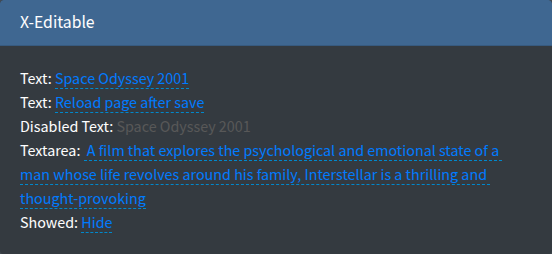
Inline editing of a single value with X-editable: the value is shown as a link, a click opens an input in place and the new value is saved by AJAX. Typical use is a cell in an index table.
Signature
Section titled “Signature”Lte3::xEditable(string $name, mixed $value = null, array $attrs = [])The value is resolved as described in Value resolution: old(), request, $value, form model, default.
Basic example
Section titled “Basic example”@foreach($products as $product) <td> {!! Lte3::xEditable('name', $product->name, [ 'pk' => $product->id, 'url_save' => route('admin.products.update-field'), ]) !!} </td>@endforeach{!! Lte3::xEditable('comment', $order->comment, [ 'type' => 'textarea', 'pk' => $order->id, 'limit_title' => 30, 'url_save' => route('admin.orders.update-field'),]) !!}
{!! Lte3::xEditable('visible', $page->visible, [ 'type' => 'select', 'value_title' => $page->visible ? 'Show' : 'Hide', 'source' => [['value' => '1', 'text' => 'Show'], ['value' => '0', 'text' => 'Hide']], 'pk' => $page->id, 'url_save' => route('admin.pages.update-field'),]) !!}| Attr | Type | Default | Description |
|---|---|---|---|
url_save | string | - | URL the new value is sent to. Without it the value changes only on the page. |
pk | mixed | random string | Primary key sent with the value, usually the record id. |
type | string | text | X-editable input type: text, textarea, select, checklist, number, email, url, … |
data_type | string | - | Same as type, takes precedence over it. |
source | array | - | Options for select/checklist: [['value' => 1, 'text' => 'Show'], ...] or [1 => 'Show', 0 => 'Hide']. JSON-encoded into data-source. |
value_title | string | - | Text of the link instead of the raw value, e.g. the option text of a select. |
label | string | - | Text of the link when both value_title and the value are null. Otherwise [------] is shown. |
limit_title | int | - | Cuts the link text to this many characters (Str::limit). |
limit_end | string | ... | Ending appended by limit_title. |
viewformat | string | - | X-editable viewformat for date types. |
disabled | bool | false | Shows the value without editing. |
readonly | bool | false | Same as disabled. |
class | string | - | Extra classes of the link. |
class_wrap | string | - | Also added to the link (there is no wrapper). |
attrs | array | [] | Extra HTML attributes of the link, e.g. data-* options of X-editable. |
field_attrs keys (title, id, style, …) are printed on the link. There is no label element, help text or validation error output.
Endpoint
Section titled “Endpoint”Request (X-editable default):
- Method:
POSTtourl_save, AJAX with the CSRF header from the layout. - Body:
name(the field name),value(the new value; an array forchecklist),pk.
Response:
{"status": "ok", "message": "Saved", "_action": "reload"}message— shown as a toast: an error toast whenstatusis"error", a success toast otherwise._action: "reload"— reloads the page after saving.- Any 2xx response is treated as saved and the new value stays on the page, even with
status: "error". To reject a value, return an HTTP error status (e.g.422); X-editable keeps the input open and shows the response text under it.
public function updateField(Request $request){    $request->validate(['pk' => 'required|integer', 'name' => 'required|in:name,comment', 'value' => 'nullable|string|max:255']);
    Product::findOrFail($request->pk)->update([$request->name => $request->value]);
return response()->json(['message' => 'Saved']);}JS behaviour
Section titled “JS behaviour”- Init:
$('.f-x-editable').editable({...})in the package layout (layouts/inc/options.blade.php), once on page load, withmode: 'inline'andinputclass: 'form-control-sm'. It is not part ofLte3.init(), so links inserted later (modals, AJAX content) are not editable until you call.editable()on them. - Data attributes on the link:
data-name,data-value,data-pk,data-type,data-url,data-source,data-viewformat,data-disabled.
See JavaScript API.