select2
A dropdown based on Select2 4.0: single or multiple choice, AJAX search, tags with creation of new values, AJAX save on change and toggling of page blocks.
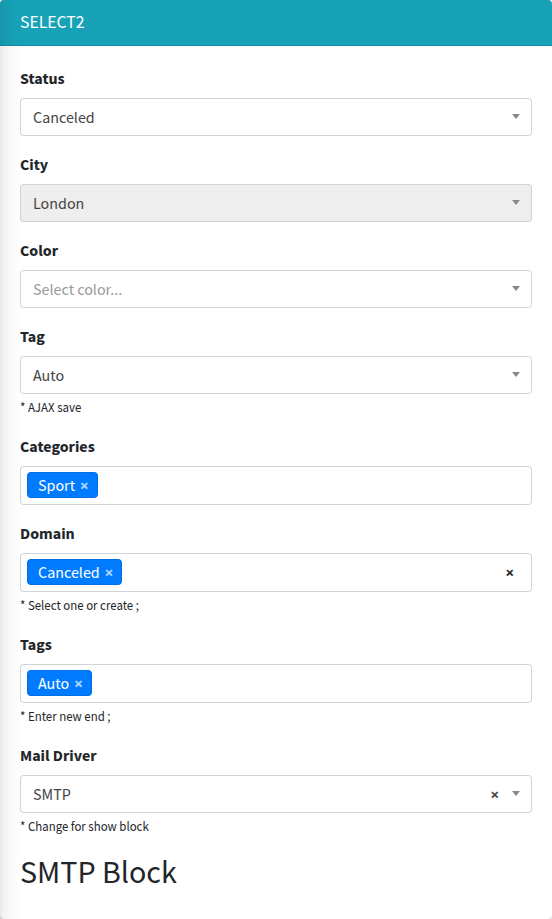
Signature
Section titled “Signature”Lte3::select2(string $name, mixed $selected = null, array $options = [], array $attrs = [])Basic example
Section titled “Basic example”{!! Lte3::select2('status', 'canceled', [ 'new' => 'New', 'pending' => 'Pending', 'canceled' => 'Canceled',], [ 'label' => 'Status', 'disableds' => ['pending'],]) !!}
{!! Lte3::select2('color', null, ['Green', 'Red', 'White'], [ 'label' => 'Color', 'empty_value' => '--', 'placeholder' => 'Select color...',]) !!}
{!! Lte3::select2('categories', $post->categories->pluck('id')->all(), $categories->pluck('name', 'id')->all(), [ 'label' => 'Categories', 'multiple' => true,]) !!}Options
Section titled “Options”$options is a plain PHP array (convert Collections with ->pluck('name', 'id')->all()). Three forms are supported:
| Form | Example | Option value | Option text |
|---|---|---|---|
| Associative | ['new' => 'New'] | the key | the value |
| List of strings | ['Green', 'Red'] | lowercased string (green) | string with the first letter uppercased (Green) |
| Arrays | [['id' => 3, 'name' => 'Sport']] | first of id, slug, key, value, otherwise the key | first of label, name, title, otherwise the key |
An array that mixes forms ([['id' => 'night', ...], 'day' => 'Day', 'evening']) counts as associative: scalar elements use their key as the value.
Selected values
Section titled “Selected values”Resolved in the component view, not by the common Value resolution:
$selected, if notnull.- Otherwise the form model attribute
$model->{$name}, ifLte3::formOpen(['model' => ...])is open. - Otherwise
old($name). - Otherwise the
defaultattr.
The result is wrapped into an array and merged with old($name) (old values win). An option is selected when its value is in this array (loose in_array, so 3 matches '3').
request() and getFormValue() are not used, and the model lookup reads the attribute by the literal field name. For a relation, pass the ids explicitly: $post->categories->pluck('id')->all(). A Collection passed as $selected is not unwrapped.
| Attr | Type | Default | Description |
|---|---|---|---|
label | string | Str::studly($name) | Label HTML. '' hides it. |
help | string | - | Help HTML under the field. |
default | mixed | - | Selected value(s) when there is no $selected, model and old input. |
multiple | bool | false | Multiple choice; the name gets []. See max. |
max | int | - | With url_tags: maximum number of selected tags. 1 with multiple submits a scalar (name without []). |
empty_value | string | - | Adds a first option with value '' and this text (single select only) and enables the clear button. |
placeholder | string | - | Select2 placeholder. For a single select it shows only together with an empty option (empty_value). |
allowClear | bool | false | Shows the clear button (x). |
disableds | array | [] | Option values to disable. |
disabled | bool | false | Disables the select. |
class | string | - | Extra classes of the <select>. |
class_wrap | string | - | Extra classes of the wrapper .form-group.f-select2-wrap. |
hidden_wrap | bool | false | Hides the whole field. |
id | string | name (with [] for multiple) | id of the <select>. The label for always uses the name. |
data | array | - | data-* attributes of the <select>. |
map | array | - | Shows and hides page blocks by the selected value, see Toggle blocks. |
url_suggest | string | - | Loads options by AJAX while typing, see AJAX search. |
url_tags | string | - | Tags mode: AJAX options plus new values typed by the user, see Tags. |
separators | string | [",", ";"] | With url_tags: JSON array of characters that finish a tag. |
new_tag_label | string | (new) | With url_tags: suffix shown after a not yet existing tag in the dropdown. |
url_save | string | - | Saves the value by AJAX on change, see AJAX save. |
method_save | string | POST | HTTP method of the AJAX save. |
attrs | array | [] | Extra HTML attributes of the <select>. |
field_attrs keys (required, placeholder, x-model, …) are printed on the <select>.
Automatic behaviour:
- Five or fewer options (and no
url_suggest): the search box in the dropdown is hidden. - More than six options, single select without
empty_value: a disabled---option is added on top, so nothing looks selected until the user chooses.
What is submitted
Section titled “What is submitted”- Single:
name=value. - Multiple:
name[]=value1&name[]=value2, i.e. an array. Nothing selected sends nothing, so the key is missing; use$request->input('categories', []).
Toggle blocks
Section titled “Toggle blocks”map links option values to CSS selectors. The blocks of the selected value are shown, the blocks of other values are hidden, on page load and on every change:
{!! Lte3::select2('driver', 'smtp', ['log' => 'Log', 'smtp' => 'SMTP', 'sendmail' => 'Mail'], [    'label' => 'Mail Driver',    'map' => [        'smtp' => ['.block-smtp'],        'log' => ['.block-log', '.block-log-sendmail'],        'sendmail' => ['.block-sendmail', '.block-log-sendmail'],    ],]) !!}
<div class="block-smtp" style="display: none;">SMTP settings</div><div class="block-log" style="display: none;">Log settings</div><div class="block-sendmail" style="display: none;">Sendmail settings</div><div class="block-log-sendmail" style="display: none;">Common for Log and Sendmail</div>
A selector can belong to several values. Hidden blocks are still submitted with the form. Works for single selects only (the first selected value is used).
AJAX search
Section titled “AJAX search”With url_suggest, options are loaded from the server while the user types. Render the currently selected items as $options, otherwise they are not shown:
{!! Lte3::select2('user_id', $order->user_id, $order->user ? [$order->user->id => $order->user->name] : [], [ 'label' => 'Customer', 'url_suggest' => route('admin.users.suggest'), 'empty_value' => '', 'placeholder' => 'Search...',]) !!}Request: GET {url_suggest}?term=...&q=...&_type=query (Select2 defaults; term and q hold the same search string, page is added when paginating).
Response:
{ "results": [ {"id": 1, "text": "Pending"}, {"id": 2, "text": "Canceled"} ], "pagination": {"more": false}}pagination is optional. Filtering is the server’s job:
public function suggest(Request $request){    $users = User::where('name', 'like', '%' . $request->input('term') . '%')->limit(20)->get();
return response()->json([ 'results' => $users->map(fn ($u) => ['id' => $u->id, 'text' => $u->name]), ]);}With url_tags, the dropdown shows options from the server (same request and response as AJAX search) and also lets the user create new values by typing. A tag is finished by Enter or by a separator character.
{!! Lte3::select2('tags', $post->tags->pluck('id')->all(), $post->tags->pluck('name', 'id')->all(), [ 'label' => 'Tags', 'multiple' => true, 'url_tags' => route('admin.tags.suggest'), 'separators' => '[";"]', 'new_tag_label' => ' [NEW]', 'max' => 4,]) !!}- A new tag is submitted as its typed text (
id= text), existing ones as theirid. The server has to tell them apart, e.g. byis_numeric()or by looking the value up. maxlimits the number of tags (Select2maximumSelectionLength).separatorsis parsed by jQuery as JSON, so use double quotes inside:'[";", ","]'.
$ids = collect($request->input('tags', [])) ->map(fn ($v) => ctype_digit((string) $v) ? (int) $v : Tag::firstOrCreate(['name' => $v])->id) ->all();AJAX save
Section titled “AJAX save”With url_save, every change sends the value right away, without submitting the form:
{!! Lte3::select2('status', $order->status, $statuses, [ 'label' => '', 'url_save' => route('admin.orders.update-field', $order),]) !!}Request: {method_save} (POST by default) to url_save with
name— the field name without[];value— the selected value; for a multiple select an arrayvalue[], and novaluekey when nothing is selected.
Response (JSON):
{"message": "Status saved", "operation": "reload"}message— shown as a success toast, if present.operation: "reload"— reloads the page.- HTTP error — an error toast.
url_save can be combined with url_suggest or url_tags.
JS behaviour
Section titled “JS behaviour”- Init:
initSelect2(root)on.f-select2elements, called on page load and for content inserted later (modals, mb-blocks,.js-ajax-sendresponses), see Dynamic content. Already initialized selects are skipped; to apply new options call.select2('destroy')first. - The dropdown is attached to the field wrapper (
dropdownParent), so it works inside Bootstrap modals. - Every select gets a unique
data-select2-id, so a field with the sameidon the page and in a modal do not break each other. - The UI language comes from
<html lang>. - Data attributes:
data-url-suggest,data-url-tags,data-url-save,data-method-save,data-max,data-separators,data-new-tag-label,data-map,data-name.
See JavaScript API.
Related
Section titled “Related”- select2Tree — select2 with a hierarchical options tree.
- radiogroup — the same
mapfor radio buttons.