mediaFile, mediaImage
Files of a Spatie MediaLibrary collection: drop zone, previews of picked files before saving, thumbnails, delete with restore, drag-and-drop sorting, file properties (alt, title, …) in a modal and an optional main file. The form fields are made for fomvasss/laravel-medialibrary-extension: the controller saves everything with $model->mediaManage($request).
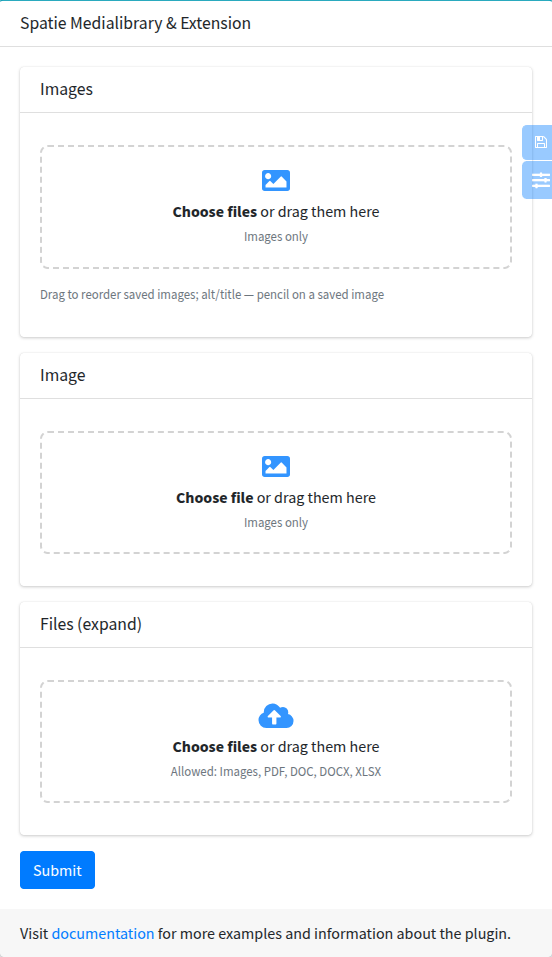
mediaImage is the same component for images: a thumbnail grid instead of a file list, accept="image/*".
Signature
Section titled “Signature”Lte3::mediaFile(string $name, ?HasMedia $model = null, array $attrs = [])Lte3::mediaImage(string $name, ?HasMedia $model = null, array $attrs = [])| Component | Config default |
|---|---|
mediaFile | - |
mediaImage | ['is_image' => true, 'accept' => 'image/*'] |
$model is the model whose media are shown. When it is null, the model of Lte3::formOpen(['model' => ...]) is used; without both (a create form) the field shows no saved files. A model that doesn’t implement Spatie\MediaLibrary\HasMedia is reported inside the field.
Basic example
Section titled “Basic example”{!! Lte3::formOpen(['action' => route('admin.articles.update', $article), 'method' => 'PUT', 'model' => $article, 'files' => true]) !!}
{!! Lte3::mediaImage('images', $article, [ 'label' => 'Gallery', 'multiple' => true, 'custom_properties' => ['alt', 'title'],]) !!}
{!! Lte3::mediaImage('image', $article, [ 'label' => 'Cover', 'custom_properties' => ['alt' => 'Alt text'],]) !!}
{!! Lte3::mediaFile('files', $article, [ 'label' => 'Documents', 'multiple' => true, 'accept' => '.pdf,.doc,.docx,.xlsx',]) !!}
{!! Lte3::btnSubmit('Save') !!}{!! Lte3::formClose() !!}public function update(ArticleRequest $request, Article $article){ $article->update($request->validated()); $article->mediaManage($request);
return back();}The model, with collections image (single) and images, files (multiple):
use Fomvasss\MediaLibraryExtension\HasMedia\HasMedia;use Fomvasss\MediaLibraryExtension\HasMedia\InteractsWithMedia;
class Article extends Model implements HasMedia{    use InteractsWithMedia;
    protected $mediaSingleCollections = ['image'];
    protected $mediaMultipleCollections = ['images', 'files'];}
mediaManage() reads the request fields named after each collection, so the field name must be the collection name. Collections that are not listed in the model are not saved.
| Attr | Type | Default | Description |
|---|---|---|---|
multiple | bool | false | Several files. Without it the field holds one file and a new file replaces the saved one. Should match the collection type in the model. |
is_image | bool | false (true for mediaImage) | Thumbnail grid instead of a list. |
accept | string | image/* with is_image | Allowed types, as in <input type="file">. Shown under the drop zone in words; other files are not added. |
custom_properties | array | [] | Editable file properties, see Properties. |
format | string | lte3.view.media.format (legacy) | legacy or expand, see Formats. |
main | bool | false | Star to mark the main file. Only expand + multiple. |
thumb_size | int | lte3.view.media.thumb_size (110) | Minimal width of an image tile in the grid, px. |
collection | string | name | Collection whose saved files are shown. Field names are still built from name. |
name_deleted | string | {name}_deleted | legacy: name of the delete inputs. |
name_weight | string | {name}_weight | legacy: name of the order inputs. |
name_custom | string | {name}_custom | legacy: name of the property inputs. |
label | string | Str::studly($name) | Card title HTML. '' hides the card header. |
help | string | - | Help HTML under the drop zone. |
class | string | - | Extra classes of the file input. |
class_wrap | string | - | Extra classes of the wrapper card. |
disabled | bool | false | Disables the drop zone (no new files). |
field_attrs keys (required, id, data-name, …) are not rendered by this component.
Formats: legacy and expand
Section titled “Formats: legacy and expand”legacy (default) | expand | |
|---|---|---|
| Fields | name[] / name, name_deleted, name_weight[id], name_custom[id][prop] | a row per file: name[N][id] or name[N][file], [weight], [delete], [is_main], [<property>] |
| Order | saved files; new ones are added at the end | all files, new ones included |
| Properties of new files | single field only (name_custom[new][prop]) | yes |
Main file (main) | no | yes |
Properties written by mediaManage() | any | only media-library-extension.expand.allowed_custom_properties |
| Extension version | any with the simple format | 6.4.1+ (for a collection named files, query, request, …) |
legacy keeps the fields of the field before 1.121. Use expand where you need properties or order of new files, or the main file. Per field:
{!! Lte3::mediaFile('files', $article, [ 'multiple' => true, 'format' => 'expand', 'main' => true, 'custom_properties' => ['alt', 'title'],]) !!}Or for the whole project:
'view' => [ 'media' => [ 'format' => 'expand', ],],With expand, a property not listed in media-library-extension.expand.allowed_custom_properties (default alt, title) is not saved; the field shows a warning with its name.
What is submitted: legacy
Section titled “What is submitted: legacy”Multiple, Lte3::mediaImage('images', $article, ['multiple' => true, 'custom_properties' => ['alt']]) with saved media 13 and 15:
| Field | Value |
|---|---|
images[] | new files |
images_deleted[] | one per saved file: '' or the media id to delete |
images_weight[13], images_weight[15] | positions of saved files |
images_custom[13][alt], images_custom[15][alt] | properties of saved files |
Single, Lte3::mediaImage('image', $article, ['custom_properties' => ['alt']]) with saved media 7:
| Field | Value |
|---|---|
image | the new file; the extension deletes the old one |
image_deleted | '' or 7 |
image_custom[7][alt] | property of the saved file |
image_custom[new][alt] | property of the new file |
When a new file is picked in a single field, the inputs of the saved file are disabled and not sent.
What is submitted: expand
Section titled “What is submitted: expand”Multiple, Lte3::mediaFile('files', $article, ['multiple' => true, 'format' => 'expand', 'main' => true, 'custom_properties' => ['title']]):
| Field | Value |
|---|---|
files[0][id] | 13 (saved file) |
files[0][delete] | 0 or 1 |
files[0][weight] | position on screen |
files[0][is_main] | 0 or 1 |
files[0][title] | property |
files[2][file] | new file (UploadedFile) |
files[2][weight], files[2][is_main], files[2][title] | same keys for the new file |
Saved files take indexes 0..n-1, new files continue from n; a removed new file leaves a gap. Single field: one row without an index, image[id], image[delete], image[<property>] for the saved file or image[file], image[<property>] for a new one.
Validation
Section titled “Validation”In legacy, name.* is a file:
'images' => ['nullable', 'array'],'images.*' => ['image', 'max:10240'],'image' => ['nullable', 'image', 'max:10240'],In expand, name.* is an array and the file is in name.*.file; a rule 'files.*' => 'file' rejects the whole form. A rule that accepts both formats:
use Illuminate\Validation\Rule;
'files' => ['nullable', 'array'],'files.*' => Rule::forEach(fn ($value) => is_array($value) ? ['array'] : ['file', 'max:51200', 'mimes:jpg,png,pdf']),'files.*.file' => ['nullable', 'file', 'max:51200', 'mimes:jpg,png,pdf'],
A single expand field: 'image' => ['nullable', 'array'], 'image.file' => ['nullable', 'image', 'max:10240'].
Properties
Section titled “Properties”custom_properties takes fields in the Lte3::field() format:
'custom_properties' => ['alt', 'title'],
'custom_properties' => ['alt' => 'Alt text', 'title' => 'Title'],
'custom_properties' => [    ['name' => 'alt', 'label' => 'Alt text'],    ['name' => 'caption', 'label' => 'Caption', 'type' => 'textarea', 'rows' => 3],],
A label not given is __(Str::ucfirst($name)) (Alt, Title). Every file gets a pencil button; it opens a modal with a preview and the fields (any type Lte3::field() renders). Values are written into hidden inputs of the file row and saved with the form, into the media custom_properties ($media->getCustomProperty('alt')).
The first filled property is shown under the file name. With an alt property, an image without alt is marked “No alt”. In legacy with multiple, new files have no pencil: their properties can’t be sent before they have an id.
Main file
Section titled “Main file”With format => expand, multiple and main => true, every file has a star. Only one file can be the main one; it is sent as is_main = 1, and the extension resets is_main of the other media of the collection. The flag is the is_main column added by the extension migration.
$cover = $article->getMedia('files')->firstWhere('is_main', true);Order and deletion
Section titled “Order and deletion”- Order: in a multiple field files are sorted by dragging (grid in both directions, list by the handle). The position is written into the weight inputs; the extension saves it to
order_column. Inlegacyonly saved files can be moved, new files stay at the end. - Delete a saved file marks it “Will be deleted” with a Restore button; the delete flag is sent with the form. A new (not saved) file is removed from the form at once.
- Single field: while it has a file, the drop zone is hidden and the file has a Replace button. A newly picked file hides the saved one; removing the new file brings the saved one back.
Thumbnails
Section titled “Thumbnails”Image thumbnails of saved media come from MediaThumbUrlResolver::resolve($media, $thumbSize) with the driver from lte3.view.media.thumb:
| Driver | Thumbnail |
|---|---|
conversion (default) | $media->getUrl('thumb') (conversion_name); the original while the conversion is not generated yet. |
imagepreset | imagepreset_url() with imagepreset_params, size 2 × thumb_size. |
| callable | fn (Media $media, ?int $size): string. |
Picked files are previewed in the browser before upload. Driver details and setup: Media thumbnails.
thumb_size (attr) or lte3.view.media.thumb_size (config, 110) sets the minimal tile width of the grid.
JS behaviour
Section titled “JS behaviour”- Behaviour is in
main.js, styles inmain.css. Click, drop, delete, properties and star handlers are delegated;initMediaFile(root)sets up sorting and the state of the fields insideroot. It runs on page load and is registered in the automatic init of dynamic content, so fields in AJAX modals and repeater items need nodata-fn-inits. - Every picked file is moved into its own
<input type="file">of the row (DataTransfer), and the form is sent by a regular submit. The form must bemultipart/form-data('files' => true). - The properties modal is moved to
<body>when it is opened the first time. Its own inputs (f_media_prop[...]) only edit the row values; until the modal has been opened they are inside the form and are submitted too, so ignoref_media_propin the request. - Sorting needs jQuery UI sortable (included in the package layout).
If lte3 assets are published as a copy instead of a symlink, publish them again after an update. The layout loads main.js / main.css through lte3_asset(), which adds a version parameter. A published or copied components/mediaFile.blade.php keeps the old UI (before 1.121).
Translations
Section titled “Translations”Texts are English through __(). Add the keys to lang/<locale>.json:
{ "Choose file": "Оберіть файл", "Choose files": "Оберіть файли", "or drag them here": "або перетягніть сюди", "Images only": "Лише зображення", "Allowed: :types": "Дозволено: :types", "Not allowed: :files.": "Не підходить: :files.", "Images": "Зображення", "Video": "Відео", "Audio": "Аудіо", "New": "Новий", "Remove": "Прибрати", "Delete": "Видалити", "Restore": "Відновити", "Replace": "Замінити", "Download": "Завантажити", "Edit": "Редагувати", "Main": "Головне", "Drag to reorder": "Перетягніть, щоб змінити порядок", "Will be deleted": "Буде видалено", "No alt": "Немає alt", "Cancel": "Скасувати", "Done": "Готово"}Property labels without label are translated too (Alt, Title).