treeview
A tree of checkboxes, based on bootstrap-treeview, that submits the ids of the checked nodes. The tree is loaded by AJAX or passed as static data.
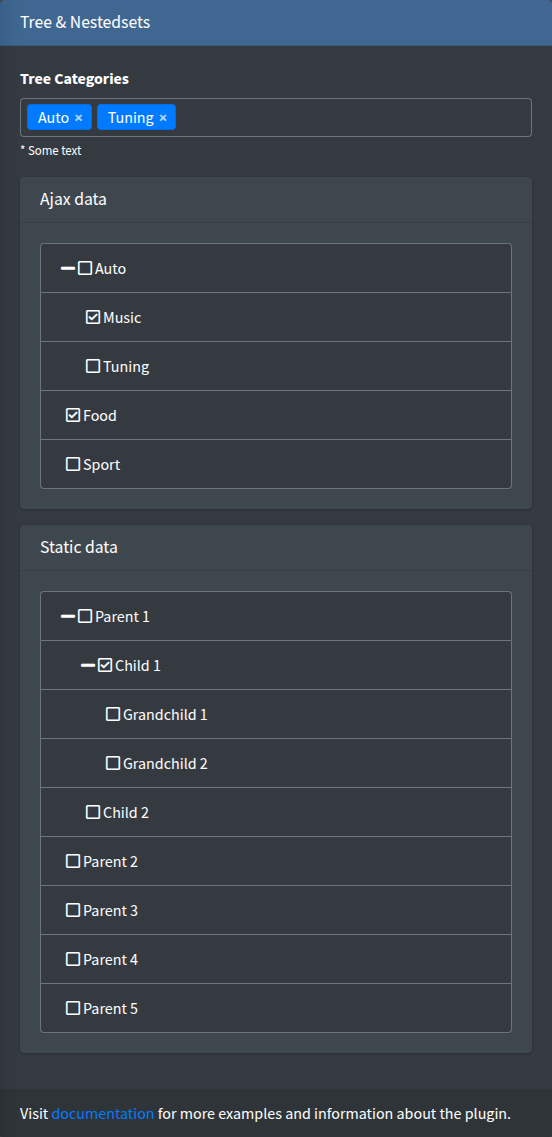
Signature
Section titled “Signature”Lte3::treeview(string $name, array $attrs = [])The component has no value argument: which nodes are checked is part of the tree data (state.checked).
Basic example
Section titled “Basic example”{!! Lte3::treeview('category_ids', [ 'label' => 'Categories', 'url_tree' => route('admin.categories.treeview', ['selected' => $product->categories->pluck('id')->all()]),]) !!}
{!! Lte3::treeview('models', [ 'label' => 'Static data', 'data' => $tree,]) !!}| Attr | Type | Default | Description |
|---|---|---|---|
url_tree | string | - | Endpoint returning the tree, see Endpoint. |
data | array | - | Static tree in the bootstrap-treeview node format. Used when url_tree is not set. |
label | string | Str::studly($name) | Card title HTML. '' removes the card header. |
class_wrap | string | - | Extra classes of the wrapper .card.f-treeview-wrap. |
The field is rendered as an AdminLTE card with a loading overlay that disappears when the tree is built. It does not show validation errors or help text.
Node format
Section titled “Node format”bootstrap-treeview nodes:
[ [ 'id' => 1, 'text' => 'Parent 1', 'state' => ['expanded' => true, 'checked' => true], 'nodes' => [ ['id' => 11, 'text' => 'Child 1'], ], ], ['id' => 2, 'text' => 'Parent 2'],]id— the submitted value. Required for every node.text— the node title.nodes— children.state—checked,expanded,disabled,selected.- Other bootstrap-treeview node options (
href,tags,selectable, …) are passed through.
The treeview() helper converts an id/name/children tree into this format, marks the given ids as checked and expands all nodes:
$nodes = treeview(Category::get()->toTree()->toArray(), $selectedIds);Endpoint
Section titled “Endpoint”With url_tree, the field sends one request on init:
- Method:
GET, URL:url_treeas given plus adata=parameter. Pass the selected ids in the URL query. - Response (JSON):
{"data": [nodes]}.
public function treeview(Request $request){ return response()->json([ 'data' => treeview(Category::get()->toTree()->toArray(), $request->input('selected', [])), ]);}What is submitted
Section titled “What is submitted”For every checked node the component adds a hidden input name[] with the node id, and keeps the list in sync on every check/uncheck:
<input type="hidden" name="category_ids[]" value="2"><input type="hidden" name="category_ids[]" value="4">When nothing is checked nothing is submitted, so the key is missing: use $request->input('category_ids', []) to clear a relation.
Checking a parent does not check its children (and vice versa); each node is submitted on its own.
The form model, old() and default are not used: after a failed validation the tree shows what the endpoint or data returns. Pass old('category_ids', $current) as the selected ids to keep the user’s choice.
JS behaviour
Section titled “JS behaviour”- Init:
initTreeview(root)on.f-treeview-wrap, on page load and for content inserted later, see Dynamic content. Each field is initialized once. - Checkboxes are always shown, node icons are hidden.
- Data attributes on the wrapper:
data-url,data-data(static tree as JSON),data-field-name.
See JavaScript API.
Related
Section titled “Related”- select2Tree — the same kind of tree as a dropdown.
- nestedset — drag-and-drop ordering of a tree.