select2Tree
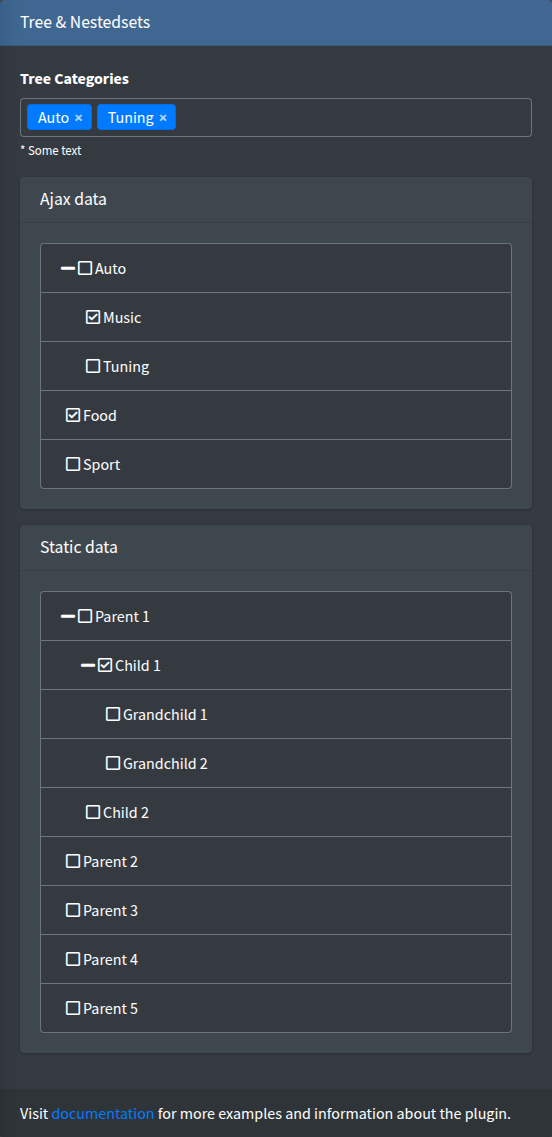
A select2 dropdown with a hierarchical (collapsible) options tree loaded by AJAX, based on select2-to-tree.
Signature
Section titled “Signature”Lte3::select2Tree(string $name, array $attrs = [])The component has no value or options arguments: both the tree and the selected values come from the url_tree endpoint.
Basic example
Section titled “Basic example”{!! Lte3::select2Tree('category_id', [ 'label' => 'Category', 'url_tree' => route('admin.categories.tree', ['selected' => [$product->category_id]]),]) !!}
{!! Lte3::select2Tree('category_ids', [ 'label' => 'Categories', 'multiple' => true, 'required' => true, 'method_get' => 'POST', 'expand_all' => true, 'url_tree' => route('admin.categories.tree', ['selected' => $product->categories->pluck('id')->all()]),]) !!}| Attr | Type | Default | Description |
|---|---|---|---|
url_tree | string | - | Endpoint returning the tree and the selected values, see Endpoint. Required. |
method_get | string | GET | HTTP method of the tree request. |
multiple | bool | false | Multiple choice; the name gets []. |
expand_all | bool | true | Expands all branches when the dropdown opens. false shows them collapsed. |
label | string | Str::studly($name) | Label HTML. '' hides it. |
help | string | - | Help HTML under the field. |
class | string | - | Extra classes of the <select>. |
class_wrap | string | - | Extra classes of the wrapper .form-group.f-select2-tree-wrap. |
hidden_wrap | bool | false | Hides the whole field. |
attrs | array | [] | Extra HTML attributes of the <select>. |
field_attrs keys (required, id, …) are printed on the <select>.
Endpoint
Section titled “Endpoint”On init the field sends one AJAX request:
- Method:
method_get(GETby default). WithPOSTthe CSRF header from the layout is sent. - URL:
url_treeas given, plus adata=parameter. Pass the selected ids in the URL query, as in the examples above.
Response (JSON):
{ "data": [ {"id": 1, "name": "Auto", "children": [ {"id": 2, "name": "Music", "children": []}, {"id": 3, "name": "Tuning", "children": []} ]}, {"id": 4, "name": "Food", "children": []} ], "selected": [1, 3]}data(orresult) — the tree. Every node hasid(option value),name(option text) andchildren(array of nodes). These field names are fixed.selected(ordefault) — the value or array of values to select.
A minimal controller, as in the package example (ExampleController::treeselect):
public function tree(Request $request){ return response()->json([ 'data' => Category::get()->toTree()->toArray(), 'selected' => $request->input('selected', []), ]);}toTree() comes from kalnoy/nestedset; any array of id/name/children nodes works.
What is submitted
Section titled “What is submitted”- Single:
name=id. - Multiple:
name[]=id1&name[]=id2. Nothing selected sends nothing.
The form model, old() and default are not used: after a failed validation the field shows what the endpoint returns, so pass old() into the URL if the choice must survive it:
'url_tree' => route('admin.categories.tree', ['selected' => old('category_ids', $product->categories->pluck('id')->all())]),JS behaviour
Section titled “JS behaviour”- Init:
initSelect2Tree(root)on.f-select2-tree-wrap, on page load and for content inserted later, see Dynamic content. Each field is initialized once. - On a failed request an error toast
Error Tree Ajax!is shown. - Data attributes on the
<select>:data-url,data-method-get,data-expandAll,data-valFld="id",data-labelFld="name",data-incFld="children".
See JavaScript API.